There are many aspects to pay attention to when using inkjet printers. So, what are the precautions for using inkjet printers? Let's take a look.
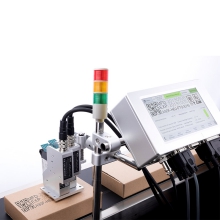
1. The ideal working environment for inkjet printers is clean and dust-free, the long-term dust accumulation will cause the surface of the carriage guide shaft and other moving parts to be dirty, which will hinder or block the movement of the print head and other moving parts, resulting in printing. Malformation of images and characters, even unable to print, will damage the printer for a long time.
2. The placement of the inkjet printer must ensure that it works on a stable platform. If it is placed incorrectly for a long time, it will affect its printing speed and print quality. In addition, do not place any objects on the printer to prevent falling objects from obstructing the normal operation of the printer cart and other components and causing unnecessary failures.
3. If your inkjet printer uses a parallel port, please do not plug or unplug the printing cable when it is powered, so as not to damage the printer port and the parallel port of the computer. Before not using the printer or moving it, make sure that the print head has returned to its original position. Reset the nozzle and cover the ink tank, then turn off the printer power, and finally unplug the power cord and signal line. On the one hand, the print head can be sealed by the protective cover at the initial position to prevent the nozzle from clogging. On the other hand, it can also avoid wasting ink when the printer restarts cleaning the print head when it is turned on next time. If an abnormal power failure occurs during work, the print head should be returned to the stand-by position to prevent the print head from drying out and causing blockage.
4. Try to use good quality print media. In order to reduce costs, many users will use low-quality plain paper to print. After a long time, the print head will easily adhere to the impurities and fine fibers of the ordinary paper, which will cause the printer nozzle to block. When using printer media, you must first determine the correct paper feeding direction, and the overlap thickness of the paper should not exceed the guide mark on the printer.
5. If you use self-filling ink, please choose high-quality ink that suits your machine type, because some low-quality fakes are relatively cheap, but there is a big difference in quality from the original or branded products. Due to the small diameter of the inkjet head, impurities in poor-quality ink can cause it to block, and the printing effect is not satisfactory. In addition, various brands and models of printers use different chemical components of ink, so, choosing the same brand of ink, and do not replace it frequently, so as not to harm the ink cartridges and print heads.
6. When the ink in the cartridge is exhausted, its detection indicator will give a reminder. At this time, the ink cartridge should be replaced in time. Different brands and models of printers have some differences in the method of replacing ink cartridges. Generally, you can replace them according to the correct method given in the printer instructions. When replacing the ink cartridge, you should be careful not to touch the outlet of the ink cartridge with your hands to prevent impurities from entering the ink cartridge. Do not spill ink on the circuit board to prevent component damage due to the conductivity of the ink. After replacing the ink cartridge, print the nozzle test line. Compared the printed test line with the pattern displayed on the screen. If there is a disconnection, jumper, etc., you must clean again until the printed test line is exactly the same as the pattern displayed on the screen.
7. Try to avoid continuous printing for a long time, because too long continuous printing time will cause the print head to overheat and other parts will fatigue. This will have an impact on the service life of the printer's nozzles, and will also have a serious impact on the print quality and printing accuracy. Therefore, it is best to let the printer take a proper rest when the print volume is too large.
评论
发表评论